Gemini Intelligence turns Android 17 into an agent that drives your apps
Google's Android Show pitched Gemini Intelligence and AppFunctions, an MCP-style way for the assistant to call inside your apps. Here's how it works and what to watch.
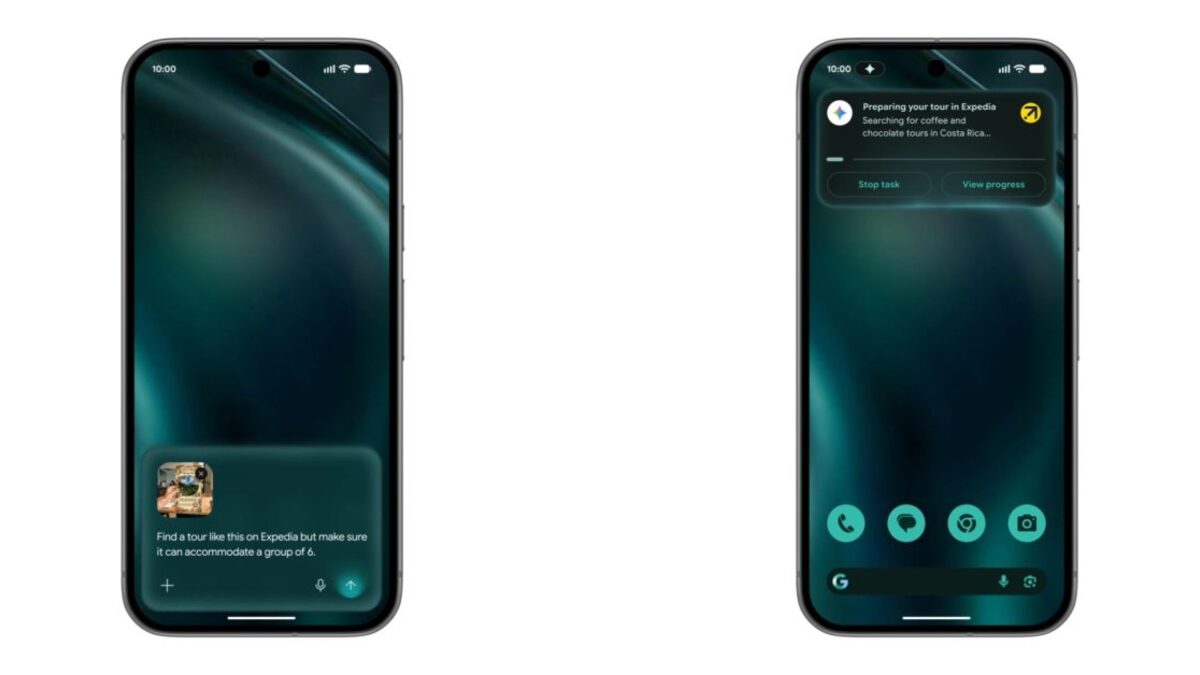
Google wants Gemini to stop talking and start doing. At the Android Show, the company laid out Gemini Intelligence, a bundle of AI features that turns the assistant from a chat box into something that reaches into your apps and acts. The plumbing is AppFunctions, an on-device API that lets an app hand Gemini a list of things it can do.
That shift, from answering to acting, is the through-line across everything Google showed for Android. It’s also the same bet Google is making with its newest model. When the company launched Gemini 3.5 Flash in May, it pitched a model built to run autonomous agents, not hold conversations. Phones are where that lands for most people. So if you own a Pixel or a Galaxy, this is the year the assistant starts trying to do your errands.
What Gemini Intelligence actually is
Strip the branding and Gemini Intelligence is three visible things plus one invisible one. The invisible piece is AppFunctions, the system-level connector. The visible pieces are the ones you’ll touch: generative widgets, smarter dictation, and assistant actions that span apps.
Start with the widgets, because they’re the easiest to picture. A feature called Create My Widget lets you describe what you want in plain language and have Gemini build it, instead of installing a static widget with a fixed layout. Want a high-protein meal-prep card or a weather widget that only shows you the one condition you care about? You ask, and the AI generates it on demand, with categories like Daily Brief, Markets, and a combo tile. The widget is built for you, not downloaded.
Then there’s Rambler, a rebuilt voice-input layer inside Gboard. Regular dictation transcribes word for word, filler and false starts included. Rambler uses Gemini to clean that up: it drops the “ums,” handles a mid-sentence correction when you change your mind, and even follows you when you switch languages partway through a sentence. It’s a small thing that you’ll use ten times a day.
The third visible piece is the agentic one. Gemini can take what’s on your screen and run with it. Google’s demo: long-press the power button over a grocery list and have the assistant build a shopping cart from it, or hand it a photo of a travel brochure and ask it to start planning the trip. The assistant works across apps in the background while you keep using the phone.
How AppFunctions works
Here’s the part developers care about, and the part that makes the rest possible. Until now, an AI assistant that wanted to “use” an app had two bad options: read the screen with accessibility hooks and guess where to tap, or wait for the app maker to build a one-off integration. Both are brittle. Screen-reading breaks the moment a layout changes.
AppFunctions takes a different route, and it’s the same one the cloud already settled on. In Google’s own words, “AppFunctions allows your application to act as an on-device MCP server.” If you’ve followed the AI-tooling world, that sentence does a lot of work. The Model Context Protocol, the spec Anthropic published for letting models call external tools through one standard interface, has become the common language for agent-to-tool plumbing. Google is bringing that pattern down to the handset.
In practice, a developer ships a Jetpack library and declares functions the app can perform: “create a cart,” “add a reminder,” “find a recipe.” Each function describes itself, so Gemini can discover it and call it by name with the right arguments. The assistant never touches the UI. It talks to the app the way one program talks to another, which is faster and far less likely to misfire than a model squinting at pixels. Android Authority’s read is blunt: this replaces inefficient visual screen analysis with direct backend communication.
Google paired the API with developer tooling, a code-generation skill and a test agent that debugs in a simulated environment, and opened an early-access program for production deployment. The catch worth flagging: the platform API and the Jetpack library are still an experimental preview. This is a direction, not a finished contract.
Who’s building it, and the model behind it
The model doing the reasoning is Gemini, and Google’s newest one is tuned for exactly this job. Gemini 3.5 Flash is built for speed and for running agent loops rather than chatting. Koray Kavukcuoglu, DeepMind’s chief technologist, put the pitch this way: “3.5 Flash offers an incredible combination of quality and low latency. It outperforms our latest frontier model, 3.1 Pro, on nearly all the benchmarks.” TechCrunch reported the model runs roughly four times faster than comparable frontier models, with an optimized variant hitting twelve times.
Speed matters more than it sounds for an agent. A chatbot can afford a two-second pause. An assistant chaining six app calls to book a flight cannot, or the whole task feels broken. Low latency per step is what makes a multi-step action feel like a single command instead of a stutter.
On the device side, this is a Google-and-Samsung show. The first wave ships this summer on the Pixel 10 and the Galaxy S26, with a later expansion to Wear OS watches, Android Auto, smart glasses, and laptops. Google says Android 17 will broaden the capabilities to reach more users, developers, and device makers, which is the polite way of saying the early rollout is gated to flagship hardware while the rest of the ecosystem catches up.
What it means, and what to watch
For users, the upside is obvious: fewer taps, less app-switching, a phone that handles the boring multi-step chores. For Android developers, it’s a real decision. Apps that expose AppFunctions become reachable by the assistant; apps that don’t may find users asking Gemini to do something and getting routed to a competitor that wired up the API. That’s a quiet but strong incentive to adopt, and it’s how Google gets an ecosystem to build the connectors it needs.
Now the caveats, because there are three that matter.
First, the action problem. A chatbot that hallucinates gives you a wrong answer you can ignore. An agent that hallucinates takes an action you have to undo. Ordering the wrong groceries, messaging the wrong contact, booking the wrong date: the cost of a mistake jumps the moment the AI has hands. Android Authority flagged this directly, warning that the lack of manual checks at every step is the real hazard. Per-step confirmation and tight permission scopes are what to watch when this ships.
Second, fragmentation. The features debut on two phone lines and stay in experimental preview for developers. Until AppFunctions is stable and broadly available, “Gemini Intelligence” means different things on a Pixel 10, a mid-range Galaxy, and a three-year-old phone that won’t see Android 17. That gap is normal for Android, but it makes “the assistant can drive your apps” a promise with an asterisk for most of the install base.
Third, the privacy surface. An assistant that can call into your apps needs to know what’s in them. Some features, like the Gemini-powered autofill, are explicitly opt-in. The on-device angle helps, since AppFunctions runs the connector locally rather than shipping every action to the cloud. But the trust ask is larger than it was for a search box, and it deserves scrutiny as the permission model gets pinned down.
Why you’re hearing about this now
The timing isn’t an accident. Two weeks ago at WWDC, Apple rebuilt Siri on a custom Google Gemini model, paying Google a reported billion dollars a year to do it. That’s Google’s model powering a rival’s assistant. Gemini Intelligence is the other side of the same strategy: Google building the agent directly into Android, with AppFunctions as the system-level hook Apple’s deal doesn’t get.
It also fits a pattern. Google has been pushing Gemini into Android XR glasses with Samsung for the fall, the company keeps shipping monthly Android security patches to keep the platform defensible, and the AI-search shift has been disruptive enough that DuckDuckGo saw an install surge from users opting out. Gemini Intelligence is the consumer-phone front of that campaign. If you want to know whether the agent era is real or marketing, the Pixel 10 this summer is where you’ll find out. Watch how often it asks before it acts. That ratio is the whole story.
Share this article
Quick reference
Sources
- AI on Android updates for building intelligent experiences from Google I/O '26 — Google
- Gemini Intelligence brings gen UI widgets, Gboard 'Rambler' to Android, debuting on Pixel & Samsung — 9to5Google
- With Gemini 3.5 Flash, Google bets its next AI wave on agents, not chatbots — TechCrunch
- Google Android AppFunctions, explained — Android Authority
Frequently Asked
- What is Gemini Intelligence on Android?
- It's Google's branding for a set of on-device AI features that go past chat: dynamic widgets, smarter Gboard dictation, and an assistant that can take actions inside your apps rather than just answer questions. It debuts on Pixel 10 and Galaxy S26 in summer 2026.
- What are AppFunctions?
- AppFunctions is a platform API and Jetpack library that lets an Android app act as an on-device MCP server. The app publishes self-describing functions, and Gemini can call them directly instead of reading and tapping through the screen.
- How is this different from Apple paying Google to power Siri?
- Different layer. Apple licenses a custom Gemini model to run Siri's reasoning on Apple servers. Gemini Intelligence is Google building the agent into Android itself, with AppFunctions as the system-level way for the assistant to reach into apps.
- When does Android 17 get it, and on which phones?
- The first wave lands this summer on Pixel 10 and Galaxy S26. Google says Android 17 will broaden the capabilities to more users, developers, and device makers. The AppFunctions API is still an experimental preview.
- Is it safe to let an AI take actions in my apps?
- That's the open question. A wrong answer in a chatbot is annoying; a wrong action, like ordering the wrong groceries or sending the wrong message, has real consequences. Permissions and per-step confirmation are what to watch as this ships.